The Microsoft Sculpt Ergonomic keyboard [1] features a detached wireless numpad which you can place wherever you want. Say what you will about Microsoft, but their input devices are quite nice.
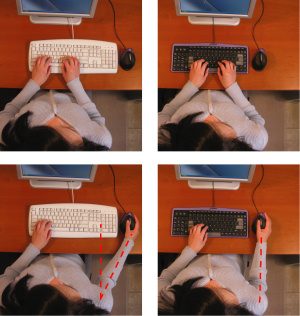
It's almost perfect. Key action is better than the Ergonomic 4000. But the screwed-up Home/End/Insert/Delete stuff is very annoying. Even months later, I'm still having to look and making mistakes. I put the numpad up on the desk past my mouse, for the few times I _need_ it.
What I'd pay $$$ for is a Sculpt keyboard with mechanical keys. Nothing else, no new inventive designs, nothing crazy or very different, nothing terribly ugly. Just put some Cherry MXes onto a Sculpt and sell it to me. All the ergo-mech keyboards seem to either have significantly different layouts, or are just huge.
[Another thing I'd pay $$$ for: sell me a kit to move the keyboard/pad on an old ThinkPad X/T/W series to transplant it onto a new one. I used to use my X201 all over, all the time. With my T440p, I actually hate using it. As in, it's negative and I actively dislike touching the damn thing.]
PSA time, I suppose: I've got a UK example of this keyboard, and it's no better than OK. The chiclet layout has ordinary-size keys, but the gaps between them (that the mechanism requires...) are larger than normal. The # key on the Sculpt is as far away from H as the Return key is normally; the Return key is another key further out. Very uncomfortable. Test drive before purchase. A big shame, because the key action is pretty good, the rearranged navigation keys are - as these things go - sensible, and of course the separate numeric pad is pretty useful. Independently-mappable space bar halves would have been nice though.
(If you have any friends in America, get one of them to buy you an American version. I bet they're much better, and the wider Return key will prove easier to reach.)
Quite why they just can't sell an MS Ergonomic 4000 with mechanical switches, I have absolutely no idea. Just about every other niche of mechanical keyboard fiend is very well served - except the people that want a split mechanical keyboard with a layout that hasn't been pissed about with. They're shit out of luck.
I've acquired two Sculpt Keyboards recently (home & work) and the numpads have remained in their respective boxes. Having the mouse closer is definitely more comfortable.
> Say what you will about Microsoft, but their input devices are quite nice.
I have a lot to say about Microsoft, but I've been a satisfied customer of their ergonomic keyboards for most of 10+ years: they're comfortable, functional, affordable and easy to find-- the latter two factors important for inevitable beverage spills...
I have recently just bought two of these (one for home and one for work) and they have helped my RSI immensely. Would highly recommend. Agree with the sibling comment about the annoying small and hard to reach Esc key though (the function keys don't really bother me).
Yeah, I ended up remapping Caps Lock to ESC. Never use Cap Lock anyway. The function keys bother me since they are used on Mac OS and are debugger shortcuts on my IDE of choice.
Look in the gaming keyboard isle. Clicky switches are huge there, and there are a lot of LAN party models which drop the numeric keypad while retaining the printscreen/insert/arrow block of keys.
Yep, switching to a tenkeyless keyboard made my wrist pain go away. The MS ergonomic keyboard I had previously didn't help a bit; switching to the narrow keyboard had an immediate impact.
But the 10-key on the left-hand side is near useless. Most people who use the 10-key are trained to use it with their right hand. It's better to just get a keyboard without a 10-key at all, put the mouse on the right and if you're an accountant, get a separate 10-key keyboard.
I would highly recommend spending a little bit more (ok, double) and investing in a TypeMatrix 2030.[0] The size/mouse position thing is important I think - and the 2030 is of comparable size - but it's nothing compared to having vertically aligned keys and the most used buttons (enter/backspace) in the middle. Also the build quality is superb. I could never go back.
It really does seem weird at first, but it really does get comfortable. It also seems to have a moderate lifespan, since I've used mine for over three years now.
I do this with a trackball; I learned to wiggle the mouse with my left hand because it fits with my desk better, and, like the product above points out, it's a little more ergonomic to avoid flying over the numpad.
In my experience, trackballs have a tendency to better support ambidextrousness.
Your left hand, assuming you have one, is not a useless appendage. It doesn't take much training to teach it to use the mouse. And then you can easily take notes while you work. Switching mouse hands was one of my better moves, I think. I now bitterly rue the years I spent wasting my time pushing it around with my writing hand. I can't play mouse games left-handed, but that's a small price to pay; the mouse is easily moved when necessary.
Bonus points: you get to do a subtle social dominance power move if you sit at a left-hander's desk to help them out. (A statement that is made with tongue in cheek, but appears to be the truth nonetheless...)
Also a fan of the Kinesis Advantage. It took a few months to get back up to typing speed, but the Advantage completely alleviated the wrist pain I had previously. I have one paired with an Apple Magic Trackpad to further reduce wrist motion, and the combo works well (for me).
>The Evoluent Mouse-Friendly Keyboard has a more sensible layout with the numeric keypad on the left so your mouse may be much closer on the right.(Patents pending.)
Moving the numeric keypad to the left deserves a patent now? I hope the patent is never issued, even with the broken system in place.
I have a large gamer mousepad, which allows me to have the mouse in front of the keyboard with the keyboard still on the mousepad. Kind of like at the end of [1]. Works much better for me than having the mouse on either side of the keyboard.
This looks absurd to me. I never put the mouse in front of my shoulder, I always use it at an angle. I'm trying to actually use the mouse like in the demo picture from the article [1] and it feels awkward.
The MS Natural Ergonomic 4000 already solves this problem [and others] for me because it works so well in my lap. The Y in this XY problem is the keyboard on the desk...well and mouse centric interface use.
Mouse ergonomics is just a weak sister of gorilla arms.
I've been looking for a keyboard with detachable numpad. Use case: Occasionally, I use Blender which has a lot of shortcuts and numpad is very useful, but I don't want to be always there . This looks promising.


[1] http://www.microsoft.com/hardware/en-us/b/sculpt-ergonomic-k...