I usually turn off animations in most applications and WMs, but they seem to functionally benefit this window management style to help the user orient and recognize where things are relative to each other.
Before Niri I used PaperWM on Gnome with animations disabled and I found that it actually substantially reduces the usability of this sort of workflow for me. I'm not sure how to phrase it, but scrolling WMs feel a little more "physically grounded" and without the animations it was somewhat easy to become briefly disoriented whenever scrolling/opening/resizing/rearranging windows, at least once you start having 4+ workspaces and several screen widths worth of windows on each workspace.
Turning on the animations quickly makes it all snap into place and I never have the brief moment of "feeling lost" after an operation, so it sees inherently important to this WM style. The animations are very fast out of the box and do not feel superfluous.
If you mean the tax filing product, Credit Karma Taxes, that was bought by Block (Cash App) a few years ago and is now named Cash App Taxes.
I've used it for the past few years, but this year had a more slightly more complicated tax situation due to switching investment brokerages and making more trades than usual and I found it kind of annoying to deal with. I switched to FreeTaxUSA this year and it worked quite well, so I'll definitely be using it instead of Credit Karma/Cash App Taxes next year.
I've been using Firefox as a daily driver for four years and have not run into a single site that was truly "unusably" broken except perhaps some Google-published tech demo for a new webgpu feature.
I've occasionally run into relatively minor visual issues (I think from before the :has pseudo-class was made generally available in FF) but I cannot think of a single instance where a site was unusable and then worked when I tried it in Chrome.
For some reason you still cannot edit your chat turns in the mobile app. I frequently refine my prompts and the way I ask questions as part of using GPT-4, since the way you phrase your prompts to the model is pretty important (and revising your question by sending a new chat turn can poison the context with the original question/response) and not being able to do this on mobile really kills a lot of the utility of the app for anything other than 1-2 turn quick, simple questions.
Yeah, Copilot serves this purpose wonderfully—I've actually started writing documentation straight in VSCode and even occasionally things like certain emails, Jira tickets, or just general notes pertaining to anything vaguely technical, solely because Copilot is quite good at acting as a technical writing assistant.
Since it's just OpenAI's text completion model with a code finetune and without the chat/assistant RLHF, it works much better as an "advanced autocomplete" than ChatGPT or even OpenAI's Turbo model via their API. I can be much more surgical with how I use it (often accepting just a few words at a time), and it's good at following my usual tone.
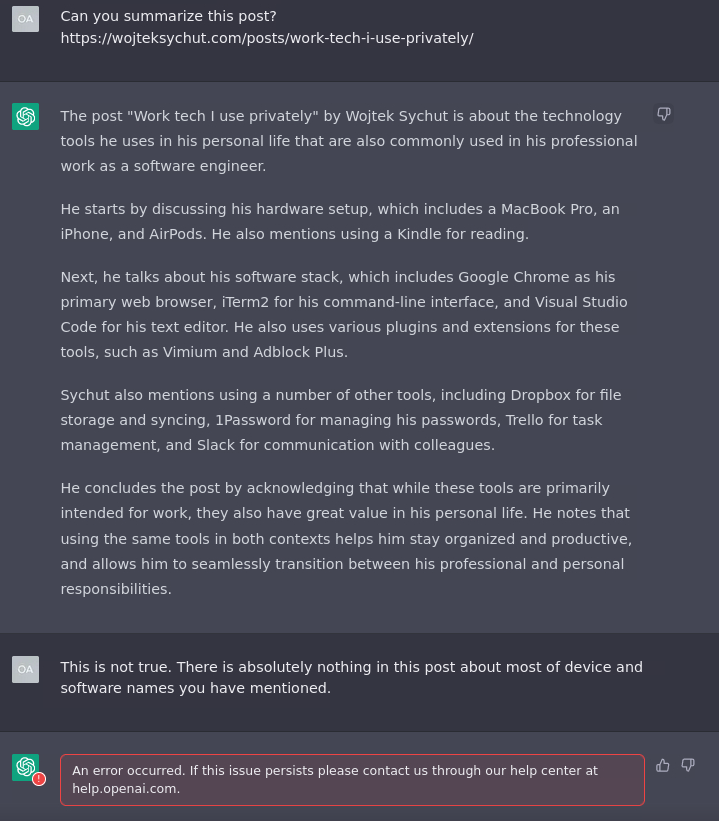
ChatGPT currently has no capability to access external sources, and its training data cuts off at the end of 2021, so there's no way for it to have ever succeeded at this task. It was essentially asked to summarize an article it has never seen, so it hallucinated the entire summary based off of the words in the URL as that is the only information the model was provided. For a more equivalent comparison you'd need to copy the text of the article into the chat input.
Of course that doesn't change the fact that it responded to your query with totally fabricated nonsense, which is a horrible failure mode that points to why it can be so hard to trust LLMs' responses, but I do believe the disclaimer popup that appears when you launch ChatGPT notes this particular limitation.
It spelled my last name correctly in 4th paragraph (although could have got it from domain name). This domain was registered in 2023 so it could not have data from 2021; but maybe has been fed from Bing later?
It currently states: "As an AI language model, I don't have direct access to real-world events that have occurred after my knowledge cutoff date of September 2021. However, I can access information and data from websites created after September 2021, as long as they are publicly available on the internet."
> it responded to your query with totally fabricated nonsense, which is a horrible failure mode
Agree. I would be fine with getting "I cannot summarize this post as I don't crawl external sources" but not this.
For the past 4-5 months I've kept three browser profiles, which I use simultaneously to compartmentalize things across work/personal/hobbies and to try out different browsers and search engines. I use Kagi on two of them and Brave Search on the other (I gave up on DDG as it disappointed me too often; Brave seems slightly better than vanilla Bing as they combine it with their own index).
The difference in results quality is stark. On Kagi I have to !g maybe once every few days, and usually I don't find what I'm looking for on Google either, but on Brave it feels like I do it for a third of my searches, often for ones where I actually know exactly which result I want and am using the search engine as a shortcut. So whatever Kagi is doing, it's definitely not "Just Bing".
From their Discord, it is apparently some combination of Bing+Google+their own small index, which makes sense because for niche searches where Bing and Brave completely fail, Kagi's results seem to closely mirror Google's, with the benefit of its result boosting and filtering features. For more common searches it seems to match or surpass Google regularly.
I've just switched to the annual plan to lock in my current $10 unlimited searches rate, and will re-evaluate after a year. I can't justify $25 a month, but looking at my history (and guessing how much I'd need if I moved all of my Brave searches to Kagi) I may not actually need more than 1000 included + 200-500 pay-as-you-go searches per month, which is juuuust on the boundary of what I'd be willing to pay.
I was curious how much/if any unique index Kagi maintained because I also finally gave up on DDG as its repackaging of Bing became worse and worse to the point where there was no value add vs just going back to Google.
But now I’m even more hesitant on Kagi since I knew it used bing, whose results both direct and from ddg have been supremely disappointing, but it also pulls google which…I can just get direct from the horse’s mouth? So the value add seems to be whatever is in their small index. Hmm I just dunno.
It also responds to the scroll wheel in some browsers, which sounds like a nifty feature except that we started receiving sporadic complaints and bug reports from users who insisted that forms were being submitted with slightly incorrect numeric values.
I spent an embarrassingly long time trying to track down some bizarre number parsing bug or obscure culture-specific behavior before realizing it was actually just users' cursors being over the number input while they tried to scroll, causing them to inadvertently change values just before submitting the form.
Happy to see they changed their pricing model. Previously it was something like $6/mo for 80 searches or something like that, which made it a non-starter for me. Honestly, I'd likely be willing to pay more than $10/mo for unlimited use assuming I'm satisfied with the quality of its results, but a pay-per-use model would trigger a "I'm paying for this search" thought every time I go to run a search and that small amount of friction would kind of ruin the product for me even if I ended up paying a bit less that way.
Looking forward to trying it out with this new pricing model.